How Node.js Handles 10,000 Requests Per Second on a Single Thread
Despite being single-threaded, Node.js can handle massive loads — even 10,000 RPS or more — efficiently by leveraging an event-driven, non-blocking I/O model and a thread pool.
This blog explains how Node.js achieves such concurrency, and why it's ideal for I/O-heavy applications.
❓Myth vs Reality
“Single‑threaded means one request at a time.”
Node.js multiplexes many I/O‑bound requests via the event loop and async I/O; only CPU‑bound work blocks.
🏗️Node.js Architecture Overview
Let's break it down visually.
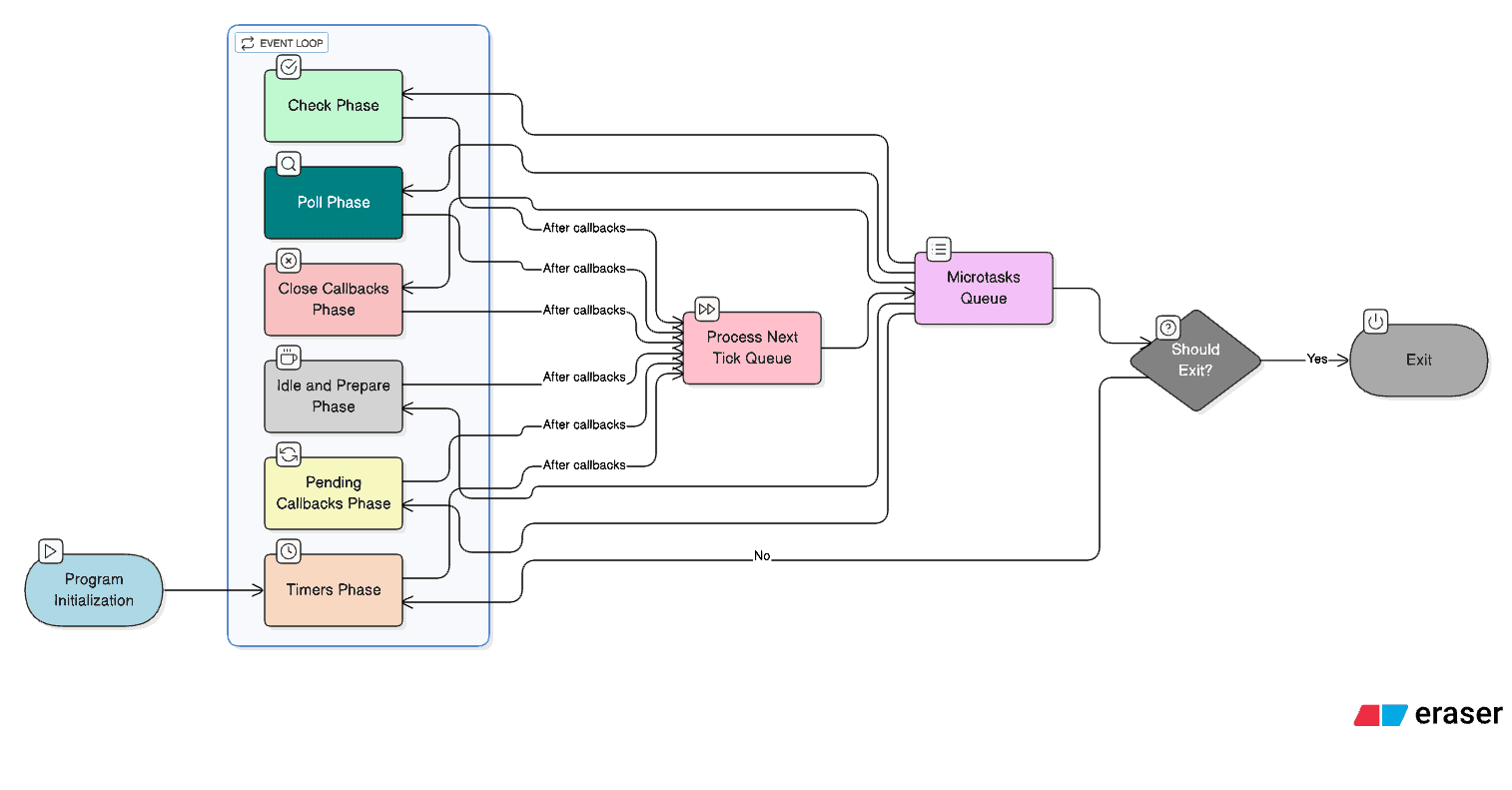
🧠Key Concepts That Enable High RPS
Event Loop
The coordinator that dispatches events to handlers without blocking.
Non‑blocking I/O
Work continues while external resources respond; callbacks resume processing.
Thread Pool (libuv)
Offloads expensive I/O tasks to worker threads so the main loop stays free.
Async Networking
Non‑blocking sockets prevent slow clients from stalling request processing.
⚙️How 10,000 RPS is Achieved
Example: 10,000 users hit an API that fetches data from Redis or a DB.
- 1Request hits Node.js.
- 2Event loop triggers a DB/Redis call.
- 3Async driver or libuv thread pool performs I/O.
- 4Event loop handles other requests meanwhile.
- 5Callback resumes, response is sent.
Clients → Node.js → Event Loop → Async I/O → Callback → Response
↘                             ↗
[No blocking in between]🧪Example: Benchmark with wrk
wrk -t4 -c200 -d15s http://localhost:3000/helloNode.js (Express) Sample Code
const express = require('express');
const app = express();

app.get('/hello', (req, res) => {
  res.json({ message: 'Hello' });
});

app.listen(3000, () => console.log('Server running on port 3000'));Important Note
The numbers you get depend on hardware, OS, Node version, workload mix, and network. Use these as a guide and always test your own stack.
⚡Why It Works Well for I/O, Not CPU
Node.js is excellent for network/database-bound workloads.
But for heavy CPU tasks (e.g., image processing), the single thread will get blocked.
Practical Tuning Checklist
- ✓Enable HTTP keep-alive; reuse connections
- ✓Avoid synchronous/blocking code in request handlers
- ✓Cache hot data (e.g., Redis) to reduce DB calls
- ✓Use JSON streaming or lighter payloads when possible
- ✓Scale via clustering or multiple containers
Common Bottlenecks
- ✗Heavy CPU work on main thread
- ✗Too much logging at high throughput
- ✗Chatty DB queries without batching or indexes
- ✗Small connection pools causing wait time
🚀How to Scale Beyond One Core
- You can use clustering (multiple Node processes)
- Or load balancers like Nginx to split requests across cores or containers
┌────────────┐
│  NGINX LB  │
└────┬───────┘
┌─────┼──────┐
┌────▼────┐  ┌────▼────┐
│ Node.js │  │ Node.js │   ← Each on separate core
└─────────┘ └─────────┘🎯Conclusion
Node.js handles 10,000+ RPS not by doing everything in a single thread, but by delegating intelligently using the event loop and non-blocking architecture.
It's like a chef who takes 10 orders and delegates prep to sous-chefs while continuing to accept new orders.
Key Takeaways
Event-Driven Concurrency
Node.js achieves high RPS by non-blocking I/O and an efficient event loop.
Scale Beyond One Thread
Use clustering or load balancers to utilize multiple cores for even higher throughput.
Thanks for reading ✦